
Showing posts with label Photoshop. Show all posts
Showing posts with label Photoshop. Show all posts
Thursday, July 17, 2008

Sunday, June 29, 2008


Thursday, June 26, 2008
Amazing Glass Ball
 Have you wonder how to do a glass ball in photoshop? I saw a nice wallpaper in Flickr recently and most of the wallpaper is done by photoshop and that is really amazing.
Here is the original wallpaper that I found from google search.
 Here is the tutorial....
1. Open this picture in photoshop CS3
2. Select rectangular marquee and set the aspect ratio to fixed: 1 to 1
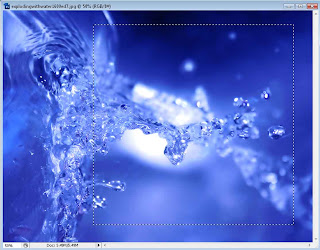
3. Apply the filter Polar Coordinates- Filter> Distort> Polar Coordinates (Polar to Rectangular)
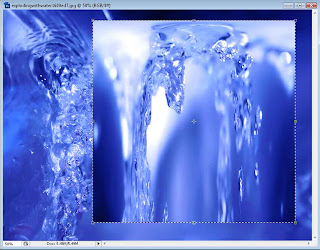
4. Rotate the selection 180 degrees- Edit> Transform> Rotate 180 degrees
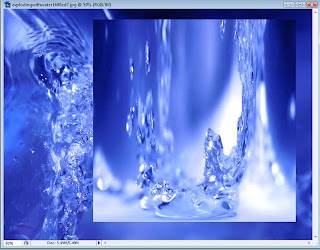
5. Apply filter Polar Coordinates again- Filter > Distort > Polar Coordinates (Rectangular to Polar)
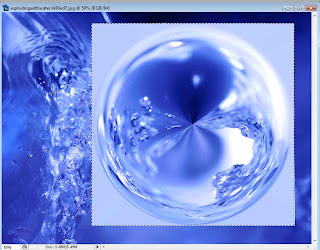
6. Crop your picture
7. Save and upload to Flickr - http://www.flickr.com/groups/amazingcircles/
2. Select rectangular marquee and set the aspect ratio to fixed: 1 to 1

3. Apply the filter Polar Coordinates- Filter> Distort> Polar Coordinates (Polar to Rectangular)

4. Rotate the selection 180 degrees- Edit> Transform> Rotate 180 degrees

5. Apply filter Polar Coordinates again- Filter > Distort > Polar Coordinates (Rectangular to Polar)

6. Crop your picture
7. Save and upload to Flickr - http://www.flickr.com/groups/amazingcircles/
This technique is created by Kamome
Try it now..
Try it now..
Here are some of the amazing balls in different scene and feeling...


 Try to add some additional effect in order to fix the glass ball nicely.
Subscribe to:
Posts (Atom)